Is Blacking Out Text the Same as PDF Redaction?
Learn why blacking out text in a PDF is not always the same as true PDF redaction, how hidden text can remain, and how to safely remove sensitive information before sharing.
Key takeaways
- Blacking out text is not always the same as true PDF redaction.
- A black box may only hide text visually while leaving the original content underneath.
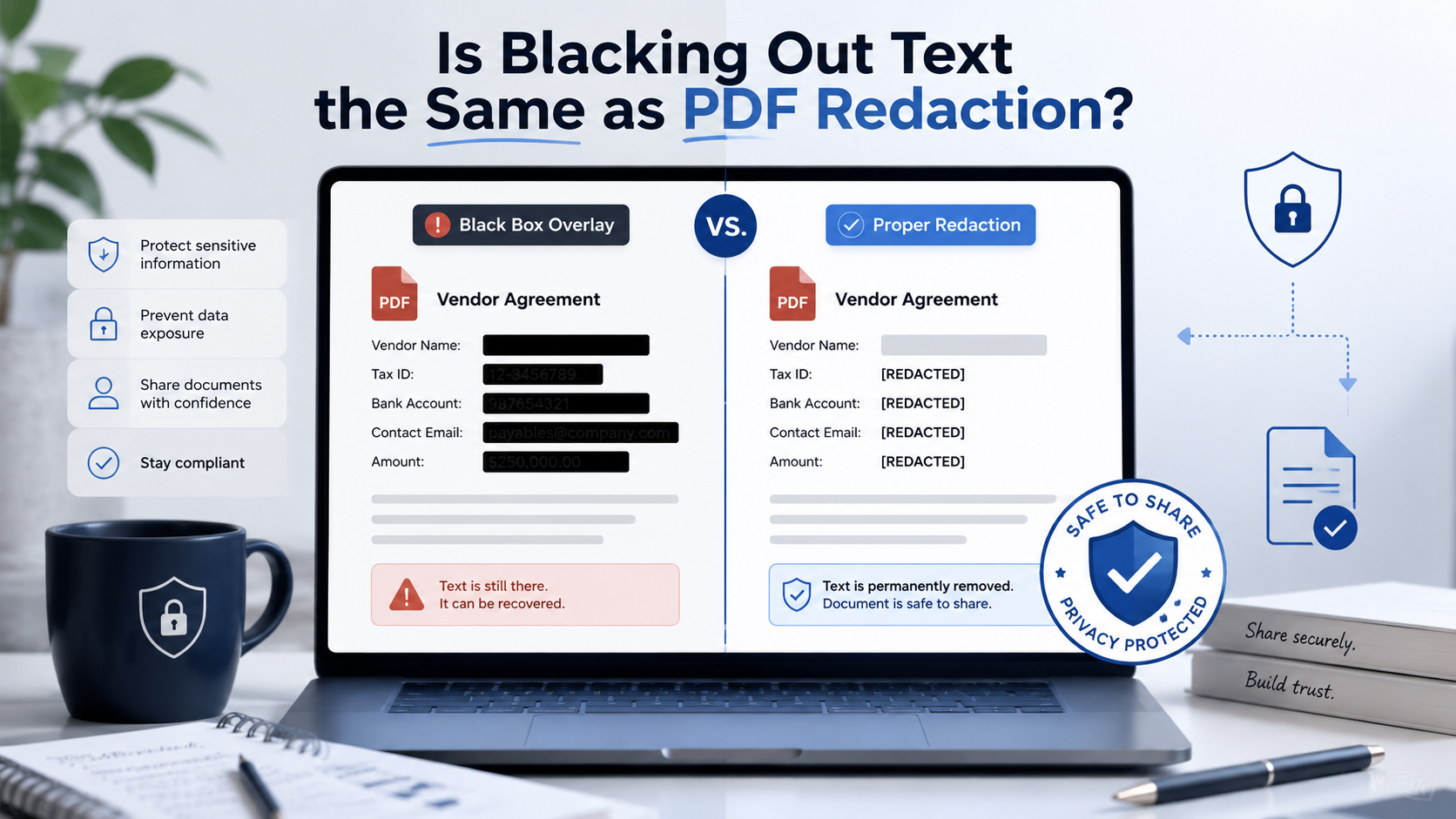
- True PDF redaction should remove the selected text, image area, or sensitive content from the redacted copy.
- You should test a redacted PDF with search, copy-paste, metadata inspection, and a second PDF viewer.
- For sensitive files, also remove hidden metadata before sharing.
What Does "Blacking Out a PDF" Mean?
Blacking out a PDF usually means placing a dark shape over sensitive information. For example, a user may open a PDF editor, draw a black rectangle over a name, save the file, and assume that the name is gone.
This can be useful for visual review, but it may not be safe if the tool only adds a shape on top of the text. The original content may still exist underneath and could be selected, copied, searched, or extracted.
- Drawing a black rectangle over text.
- Using a highlight tool with a dark color.
- Placing an image or shape over private content.
- Adding a comment or annotation that covers the text.
- Changing text color to match the background.
- Exporting a screenshot-like version without checking hidden data.
What Does True PDF Redaction Mean?
True PDF redaction means permanently removing selected sensitive content from the redacted copy. The redacted area may still appear as a black box, but the important part is what happens underneath: the original text, image region, or sensitive object should no longer remain in the shared file.
A proper redaction workflow should help you select sensitive text, images, or page areas, apply redaction to remove the selected content, clean metadata when needed, download a separate redacted copy, and verify that the removed content cannot be searched or copied from the redacted version.
This is why the phrase "black out PDF" can be confusing. Some tools use black boxes as the visual appearance of redaction, while others only place a black object over the content. The visual result may look similar. The safety level can be completely different.
Redact your PDF now
Upload a PDF, mark sensitive areas, clean metadata, and download a redacted copy. Free for documents up to 10MB.
Why Black Boxes Can Be Risky
A PDF is not just a flat image. It can contain multiple layers and object types. If a black box only sits on top of the original text, the sensitive content may still exist underneath.
Someone may be able to select the hidden text, copy and paste it, search for it inside the PDF, remove the black rectangle, hide annotations, extract the text layer, open the file in another PDF editor, or inspect PDF objects or metadata.
This is why visual masking is not enough for sensitive documents.
Black Box vs True Redaction
Here is the practical difference. Black box masking changes how the PDF looks. It may hide information from a casual viewer, but it may not remove the original data. This is risky when sharing legal agreements, bank statements, tax returns, HR documents, medical forms, invoices, loan documents, or PDF files uploaded to AI tools.
True redaction changes what the PDF contains. The selected content should be removed from the redacted copy, so it cannot be searched, copied, or revealed from the shared version. A true redaction workflow is safer for documents that contain personal, financial, legal, or business-sensitive information.
When Is Blacking Out Acceptable?
Blacking out can be acceptable during review or drafting. You may use temporary marks to decide which parts of a document should be removed. You might also use visual highlights to collaborate with a teammate before applying final redaction.
But before sharing the file externally, you should apply real redaction. A useful rule is: use black boxes for planning, use redaction for sharing.
If the document will be emailed, submitted, published, sent to a vendor, uploaded to an AI tool, or shared with a client, do not rely on visual blackout alone.
How to Safely Black Out and Redact a PDF
If your goal is to black out sensitive information safely, follow this workflow. Keep the original PDF secure and create a separate working copy. Never overwrite the original file.
Review the full PDF and look for names, email addresses, phone numbers, home addresses, account numbers, routing numbers, tax IDs, signatures, confidential clauses, internal notes, metadata, comments, attachments, and QR codes or barcodes.
Use a PDF redaction tool to mark sensitive text, images, and areas. If the PDF is scanned or image-based, use area redaction because text search may not detect the content.
Apply redaction so the selected information is removed from the redacted copy. Do not stop at drawing a rectangle. Then remove hidden metadata, which can still expose information even if the page content looks clean.
After redaction, test the final file. Search for the removed terms. Try copy-paste. Open the PDF in another viewer. Check document properties. If sensitive information still appears, do not share the file.
- Work on a copy and keep the original secure.
- Identify all sensitive content including metadata.
- Mark content for redaction using a PDF redaction tool.
- Apply redaction — do not stop at drawing a rectangle.
- Remove metadata before sharing.
- Test the final redacted copy.
PDF Redaction Safety Checklist
Common mistakes to avoid
Redact your PDF now
Upload a PDF, mark sensitive areas, clean metadata, and download a redacted copy. Free for documents up to 10MB.
Frequently Asked Questions
Is blacking out text the same as PDF redaction?
Not always. Blacking out text may only hide it visually. True PDF redaction should remove the underlying content from the redacted copy.
Can someone recover text under a black box in a PDF?
If the black box is only a shape, annotation, or overlay, the original text may still remain and could potentially be copied, searched, extracted, or revealed.
Is drawing a black rectangle over PDF text safe?
It is not safe unless the tool also removes the underlying content. A rectangle alone may only mask the text visually.
What is the safest way to black out a PDF?
Use a real PDF redaction workflow. Mark the sensitive content, apply redaction, remove metadata, download a redacted copy, and test the final file.
Does PDF redaction also remove metadata?
Only if metadata cleanup is included. Redaction removes selected page content. Metadata cleanup removes hidden document properties such as author names, timestamps, software, and file titles.
Should I redact a PDF before uploading it to ChatGPT?
Yes, if the PDF contains personal, financial, legal, business-sensitive, or confidential information that is not needed for the AI task.
Related Guides
How to Redact a PDF Safely Before Sharing
Learn how to permanently remove sensitive information from a PDF instead of simply covering it with a black box.
Redact PDF Before Uploading to ChatGPT or AI Tools
Remove names, emails, phone numbers, account details, signatures, and metadata from PDFs before uploading them to AI tools.
Can Redacted PDF Text Be Recovered?
Understand when redacted PDF content is truly removed and when black boxes or annotations may still expose hidden text.